
Backlink Monitoring
Two ways to watch your backlinks: total referring domains count, and whether a specific page still links to you.
Why monitor backlinks at all?
Backlinks decay. Pages get deleted, redesigned, redirected, or de-indexed; outbound links get scrubbed during cleanup; domains expire and get parked. If your SEO strategy relies on a specific link from a specific page — a guest post you wrote, a press mention, a partner site, a directory listing you paid for — that link can vanish at any time and you'd never know without checking. The same is true for the aggregate picture: a site that lost 40% of its referring domains over a quarter is a site whose rankings are about to slide, and the lost domains tell you which outreach campaigns are still paying off versus which have rotted.
DiagnoSEO Uptime Monitoring supports two distinct backlink-monitoring workflows. They're complementary — most teams use both.
Use case 1: monitor referring domains count
Track the total number of unique domains linking to your site. Each monitor of this type queries an authoritative backlink dataset (DataForSEO) once per day, snapshots the count, and alerts on significant changes — both losses (which usually mean something broke) and gains (which usually mean an outreach effort landed). The dashboard shows a 30-day trend so you can visually correlate referring-domain changes with rankings, traffic, or conversion changes.
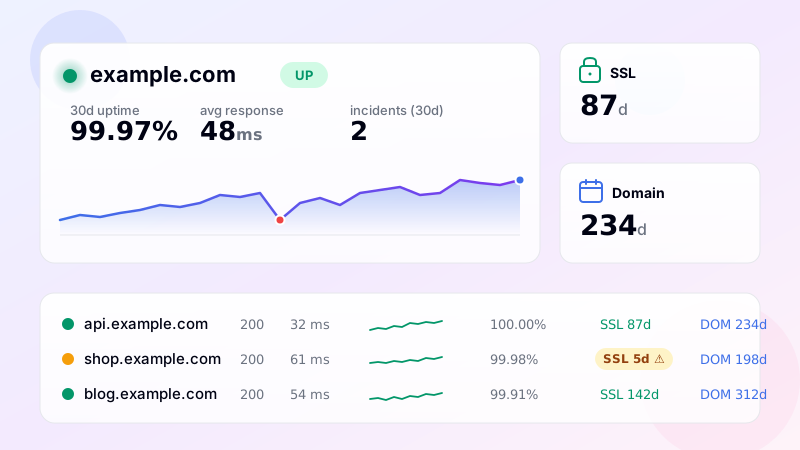
This is available on the Enterprise plan. Setup is identical to a normal monitor: enter your site URL, pick "Referring domains" as the monitor type, set the alert threshold (e.g., "alert if count drops by more than 5% week-over-week"). The monitor fits in the same dashboard alongside your HTTP and SSL checks — you see uptime, SSL expiry, domain expiry, and backlink trend in one row per site.
Use case 2: verify a specific backlink stays live
The other workflow: you have a specific page on a specific site that links to you, and you want to know the moment that link disappears. This is the post-outreach verification problem — you spent two weeks emailing a journalist who finally added you to a roundup, and three months later the article gets re-published without the link, and you find out six months after that during a backlink audit.
You can solve this with the existing keyword feature. Configure a normal HTTP monitor pointing at the page that should link to you, and put the link HTML in the keyword field — for example:
<a href="https://example.com/page">The monitor will fetch the page on every check and verify that exact HTML substring appears in the response body. If the link gets removed, the keyword check fails, you get an alert, and you have the timestamp of when the link disappeared. Pair this with quiet hours and email notifications, and you'll catch link removal within hours of it happening — not months later in your next audit.
You can also do the inverse: alert when an unwanted link appears on a page (use the "keyword must be absent" mode). Useful for monitoring competitor pages that occasionally link to you accidentally and shouldn't, or for catching unauthorized embeds of your content on sites you don't control.
Combined with the rest of the tool
Each backlink monitor inherits all the regular monitoring features: multi-region checks (verify the link is visible from different countries — some sites geo-cloak content), SSL/domain expiry warnings for the linking site (a site whose domain is expiring next week is a site whose links are about to die), incident timeline, SLA reports, and integration with email, Telegram, Slack, Discord, and SMS alerts. The link-presence check costs no extra credits beyond a normal HTTP monitor — it's just the keyword feature applied to a different use case.
See related: keyword monitoring (the underlying feature), DNS monitoring (to detect when a linking site changes hosting and might break), and domain expiration (to know when a referring domain is about to lapse).
Frequently asked questions
-
Daily query against DataForSEO's authoritative backlink dataset. Returns the count of unique referring domains. Historical snapshots are stored so the dashboard can show 30-day trend. Available on Enterprise plan.
-
Yes — that's the keyword-monitoring use case. Configure a regular HTTP monitor pointing to the linking page, with the link's HTML in the keyword field (e.g.
<a href="https://example.com/">). The monitor fails when the link disappears from the page. -
Ahrefs/Majestic are full SEO platforms with deep crawling. Our backlink monitoring is targeted — count tracking and specific-link presence checking, integrated alongside uptime/SSL/DNS monitoring. Use this if you want backlink awareness without subscribing to a separate SEO tool.
-
For specific-link monitoring (keyword feature): within the next scheduled check interval (1 minute on Pro, 30 on Advanced, 60 on Basic). For total count tracking: within 24 hours when the daily backlink dataset refreshes.
-
Yes — the dashboard supports CSV export of backlink count history per monitor. For per-link presence checks, the check log shows timestamp of every transition (link present → missing → present).
UptimeRobot · Pingdom · BetterStack · Oh Dear · Site24x7 · StatusCake · Sentry · Uptrends · Cronitor · New Relic
SSL monitoring · Domain expiry · DNS monitoring · Ping (ICMP) · Port (TCP) · Endpoint · Keyword · API · Cron / Heartbeat · Response time · Location-specific · Website monitoring