
Domain Expiration Monitoring
Forgetting to renew a domain costs more than money. It costs SEO equity, customer trust, and sometimes the entire brand. Don't forget.
Why a missed domain renewal is worse than a server outage
If your server crashes, you reboot it. If your code breaks, you roll back. If a domain expires, you can lose it. Most TLDs go through a redemption period after expiry where you can recover the domain at premium cost (often 10-100x normal renewal). After that, the domain drops back into the public pool and a domain-squatter can register it. Some businesses have lost their primary domain that way and never gotten it back. The remediation is buying a new domain, redirecting traffic, rebuilding email, contacting all integrations - weeks of work and a permanent SEO hit.
The dumb part: this almost always happens because the registrar's renewal email went to the wrong address (someone left, the email forwarding broke, the inbox is full of marketing spam). The auto-renewal failed silently because the credit card on file expired. Nobody on the current team knew the domain was up for renewal because it was registered three years ago by someone who's no longer there. The whole catastrophe is preventable with one alert.
How DiagnoSEO Uptime Monitoring tracks it
For every HTTP/keyword/API monitor, the deep daily check queries WHOIS for the registered domain (e.g. example.com from https://www.example.com/some/path). The expiration date is parsed and stored. Two providers are supported: RapidAPI (default - paid, generally more reliable) and free RDAP via rdap.org (fallback). You can choose either as your primary in Notifications > WHOIS provider.
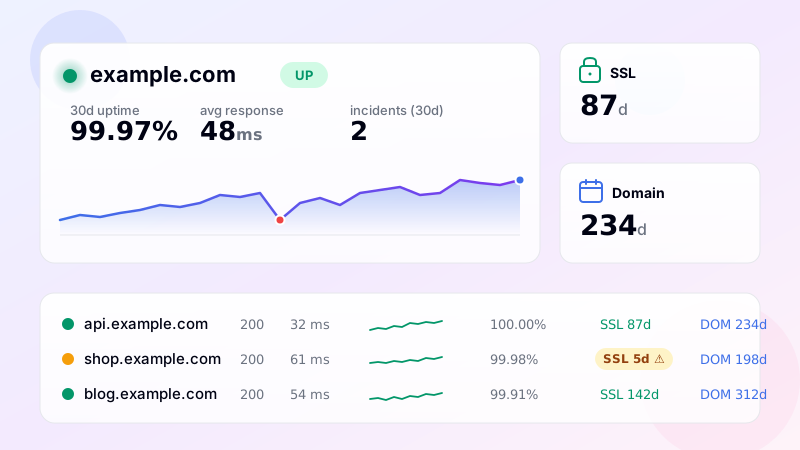
The dashboard then shows a colored "DOM Xd" pill on each monitor row: green if more than 90 days remain, orange between 30-90 days, red below 30 days (and bold-red below 7).
Warning thresholds
Alerts fire at six thresholds before expiry: 60, 30, 14, 7, 3 and 1 day. The first two (60, 30) are for planning. 14 means "this week". 7 is "this is now urgent". 3 and 1 day are last-chance pages.
The 60-day threshold matters more than people realize. Some registrars require WHOIS contact verification before they'll process a renewal, and that verification can take days. Some payment methods take 24-72 hours to clear with international registrars. Some TLDs have country-specific paperwork. Starting renewal at 60 days out leaves comfortable margin; starting at 7 days is sometimes too late.
What WHOIS doesn't tell you
WHOIS data is sometimes stale, especially for less-common TLDs. The expiration date in WHOIS is the registry's record - which the registrar updates after renewal. If your registrar takes a few days to push the renewal upstream, the WHOIS expiry might still show the old date for a while after you've actually renewed. Don't panic. The next daily check will catch the update.
For privacy-protected domains, WHOIS still returns the expiration date - that field isn't redacted. So domain expiration monitoring works fine even with WHOIS privacy enabled.
For some TLDs (notably .de, .dk and a few others), WHOIS doesn't include expiration dates at all. For these, the dashboard shows "—" for domain expiry and you'll need to track renewals through the registrar's own dashboard. Most major TLDs do include expiry: .com, .net, .org, .io, .co, .pl, .uk, .eu and most others.
Putting it all together
Combine domain expiration monitoring with SSL monitoring and you've covered both clock-driven failure modes that quietly destroy services. SSL warnings tell you the cert is about to expire; domain warnings tell you the registration is about to lapse. Both fire well in advance, both go through your chosen alert channels, both respect quiet hours. The combination is what makes a monitoring tool actually trustworthy: not just "we'll tell you if it goes down", but "we'll tell you before it goes down".
Setup
Domain expiration monitoring is automatic for every HTTP-type monitor. To pick which provider is queried (RapidAPI vs RDAP) open Notifications and set "WHOIS provider". To enable or disable the warnings independently from other alerts, toggle "Domain ≤30 days warnings" in the Preferences section.
Frequently asked questions
-
The monitor queries WHOIS once per day for each domain you monitor. WHOIS responses include the registration expiry date, which gets stored and compared against the current date to compute days-until-expiry.
-
You get warnings at 60, 30, 14, 7, 3, and 1 day before expiry. If you ignore all of them, the domain enters the registrar grace period (typically 30 days, varies by TLD). During grace, you can still renew. After grace, the domain enters redemption, then drops to public registration — at that point recovery is much harder.
-
Most major TLDs are supported via the bulk WHOIS API: .com, .net, .org, .pl, .de, .fr, .co.uk, .es, .it, .nl, .se, .fi, .ca, .com.au, and many more. For TLDs the API doesn't cover, the tool falls back to direct port 43 WHOIS queries. A handful of obscure TLDs may not return parseable expiry data.
-
The .pl registry uses a different WHOIS field for expired domains ("expiration date" = deletion date, not renewal). The tool detects the "billing period had finished" marker and shows the domain as EXPIRED with a separate deletion date — not as "expires in X days" which would be misleading.
-
Yes — there's a "Refresh now" button in the monitor toggle that queries WHOIS immediately, bypassing the 24-hour cache. There's also a "Force fresh" option that resets the cache flag so the next normal check re-queries from scratch.
UptimeRobot · Pingdom · BetterStack · Oh Dear · Site24x7 · StatusCake · Sentry · Uptrends · Cronitor · New Relic
SSL monitoring · DNS monitoring · Ping (ICMP) · Port (TCP) · Endpoint · Keyword · API · Cron / Heartbeat · Response time · Backlink · Location-specific · Website monitoring