
Multi-Location Monitoring
Your CDN routes to the wrong region. Your firewall blocks one country. Your DNS provider has a regional outage. None of that shows up in single-location monitoring.
Enable multi-location monitoring →
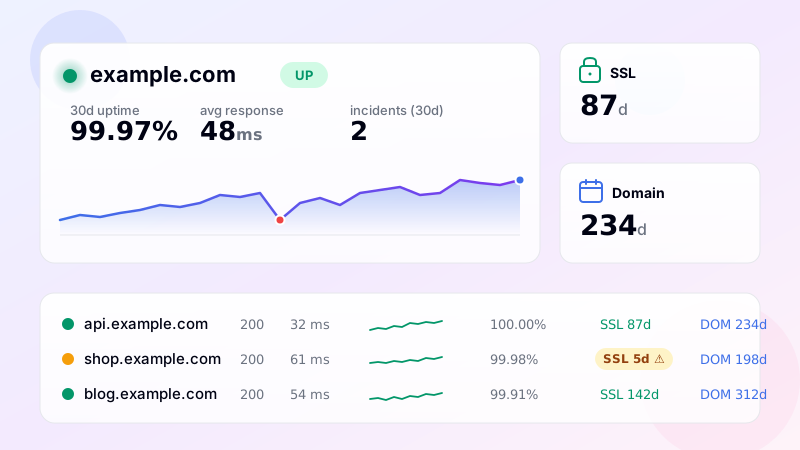
Single-location monitoring lies to you
If your monitor runs from a server in Frankfurt and your site is up in Frankfurt, the monitor reports green. That tells you nothing about a CDN edge in São Paulo returning 502 to every Brazilian visitor for the last six hours. Nothing about your firewall accidentally blocking a US/EAST IP block after a security policy update. Nothing about your DNS provider's regional outage in Australia. Nothing about geo-routing that started sending Tokyo traffic to a misconfigured Singapore origin. Each of these failures is local - they don't affect the location your monitor sits in - so they go undetected until users in those regions tell you, often days later through support tickets or a drop in revenue from that geo.
Multi-location monitoring fixes this by running the same uptime check from independent servers in different countries. Each location reports separately. If 12 of 13 locations are green and one is red, you know the problem is local to that region - and you know which region. That dramatically narrows the diagnosis: it's not your origin, it's not your code, it's something between your origin and the region.
Where checks run from
DiagnoSEO Uptime Monitoring offers checks from 13 countries via ScrapingBee's premium proxy network: United States (us), United Kingdom (gb), Germany (de), France (fr), Italy (it), Spain (es), Poland (pl), Netherlands (nl), Canada (ca), Australia (au), Japan (jp), Brazil (br) and India (in). Each location is a real residential or datacenter IP in that country, so geo-IP services - including CDNs, WAFs and personalization platforms - see the request as genuinely originating there.
This matters more than people realize. Many WAFs and bot-detection systems silently block "monitoring" IPs from common cloud datacenters. So a check that "passes" from a generic AWS us-east-1 box can still mean nothing about how a real visitor in California experiences the site. Premium-proxy locations look like real users.
What gets checked at each location
For each location you opt into, the monitor performs a full HTTP(S) request through that country's proxy. The check follows redirects, validates the expected status code, measures response time and records any error. Results are stored separately per location, so the dashboard shows you per-location uptime, RT, and the latest status of each one. If three locations are down and ten are up, that's reported clearly - the monitor isn't simply "down", it's "partially degraded".
Each location check is a real round-trip from that geography to your origin (or your CDN's edge in that geography). Response times therefore reflect actual user experience: a CDN doing its job well shows low RT in every location; a misconfigured CDN shows high RT in every region except the one nearest your origin; an origin without CDN shows progressively worse RT the further from your origin a user is.
How alerting works for multi-location
The dashboard treats multi-location results as supplementary to the primary check. Your main monitor still runs from our infrastructure and drives the basic up/down status; multi-location checks run on a separate schedule (60-minute minimum interval, configurable per monitor) and surface as additional rows in the expanded view. If you want a region-down to fire alerts, configure that in the notification preferences - any single region failing for two consecutive multi-location checks becomes an alertable event.
This split is intentional. A 1-minute check from one location can be every minute. A 1-minute check from 13 locations would be 13 round-trips per minute - expensive on every side, and operationally noisy because of inevitable per-region jitter. The 60-minute multi-location cadence is the sweet spot: catches real regional outages within an hour, doesn't generate alert fatigue.
Costs and credits
Multi-location is a premium feature because each check goes through a paid premium-proxy network. Each location, each check costs 1 credit from your DiagnoSEO account. Pricing example: 5 monitors × 4 locations × 1 check/hour × 24 hours × 30 days = 14,400 credits/month. That's a comfortable budget on Advanced/Pro plans and very useful coverage. Pick the locations that matter for your audience - if you're a US-only ecommerce, check from us, ca, mx (proxy via us); if you're EU, pick gb, de, fr, pl. Don't enable all 13 unless you genuinely have global users.
What multi-location won't catch
It's worth being clear: multi-location monitoring confirms that the HTTP layer is reachable from each region. It doesn't run JavaScript, doesn't render the page in a real browser, doesn't simulate user interactions. If your problem is a JavaScript bundle failing to load only on Safari iOS in Brazil, multi-location monitoring will pass while real users still suffer. For full browser-rendered checks, combine multi-location uptime with real-user monitoring (RUM) data from your analytics platform - the two together tell you everything.
Getting started
Open the tool, edit any monitor, expand the "Multi-location" section, tick the countries you care about, set the multi-location interval (minimum 60 minutes), save. Within an hour you'll start seeing per-location data fill in. The first time a region goes red while others stay green, you'll know exactly why this feature is worth the credits - because you would have spent the next four hours debugging the wrong layer.
Frequently asked questions
-
13 geographic regions: US (East/West), UK, Germany, France, Italy, Spain, Poland, Netherlands, Canada, Australia, Japan, Brazil, India. Each runs the same check independently and reports separately.
-
Different users see different things. A site can be UP from Europe but DOWN from Asia (regional CDN outage, DNS propagation issue, geo-routing problem). Multi-region monitoring catches these — single-region monitoring misses them entirely.
-
Each region counts as a separate check for billing. A site monitored from 3 regions every minute uses 3x the credits of a single-region check. Pick regions strategically — usually 3-5 regions covers most user geography for a typical website.
-
Yes — each region runs its check independently and triggers an alert independently. If the issue is genuinely global, you'll get alerts from all regions within the check interval. If the issue is regional, only affected regions alert — useful for diagnosis.
-
Yes. Configure per-monitor which regions run the check. E.g. for a Polish e-commerce site, run from Poland + Germany + UK. No point monitoring from Japan if you have no Japanese customers. Reduces credit usage and noise.
UptimeRobot · Pingdom · BetterStack · Oh Dear · Site24x7 · StatusCake · Sentry · Uptrends · Cronitor · New Relic
SSL monitoring · Domain expiry · DNS monitoring · Ping (ICMP) · Port (TCP) · Endpoint · Keyword · API · Cron / Heartbeat · Response time · Backlink · Website monitoring