
Response Time Monitoring
Slow is the new down. A page that takes 8 seconds to load loses users just as effectively as a page that doesn't load at all - and degradation almost always precedes outages.
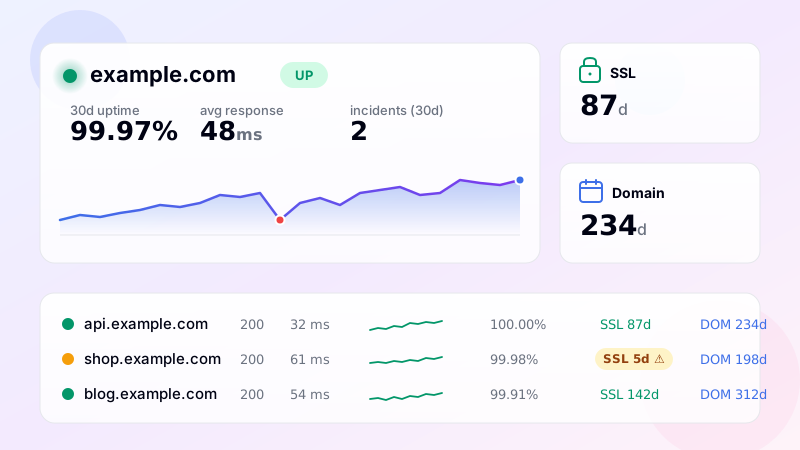
Why response time deserves its own alert
Standard uptime alerts fire on a binary signal: up or down. The grey area in between - up, but slow - is where most modern outages actually live. A misconfigured database query starts taking 4 seconds instead of 50ms. A memory leak causes garbage collection to spike. A third-party API your backend calls becomes flaky. None of these break the site outright, but they make it unusable - and they're early warnings of an outage that's an hour or two away.
Response time monitoring catches the slowdown before it becomes an outage. You configure a threshold per monitor, and once response time exceeds it for several consecutive checks, you get alerted. By the time the threshold breach fires, you've still got headroom to investigate, scale up, throttle the offending caller, or roll back the deploy that started it.
How thresholds work in DiagnoSEO Uptime Monitoring
Each monitor can be configured with two parameters: rt_threshold_ms and rt_threshold_breaches. The first is the response time in milliseconds you consider acceptable. The second is how many consecutive checks need to exceed it before an alert fires. Default values are no threshold (off) and three breaches.
The two-parameter design protects you from false positives. Network jitter happens. Garbage collection pauses happen. A single 1-second spike during an otherwise 200ms baseline isn't worth a 3 AM page. But three consecutive 1-second responses are - that's a sustained slowdown, not a blip. Pick the threshold based on observed normal behavior plus a comfortable margin: if your p95 is normally 400ms, threshold at 1000ms. If your p95 is 50ms (an internal API), threshold at 200ms.
What it pairs well with
Response time alerts work best in combination with other monitor signals. The full picture is: response time threshold tells you the system is degrading; HTTP code tells you when it actually breaks; SSL/domain warnings tell you when a clock-driven failure is approaching; DNS change alerts tell you about config drift. Together, four signals over the same monitor turn a binary "is it up" tool into proper observability.
The dashboard helps with this too. Each monitor shows a sparkline of recent response times - a quick visual indicator of degradation patterns. The expanded view shows 24-hour, 7-day and 30-day average response time trends. If you're seeing the average creep up week-over-week, that's an early signal worth investigating before it crosses your alert threshold.
Practical thresholds by site type
- Marketing landing pages: 1500ms is reasonable. They're heavy with images and tracking scripts; absolute speed matters less than steadiness.
- Ecommerce product/category pages: 800-1200ms. Slow ecom kills conversions; tighter thresholds catch issues sooner.
- Application dashboards: 500-800ms. Users expect snappy. Slow dashboards make the product feel broken.
- Public APIs: 200-400ms for the simple endpoints, higher for compute-heavy ones. Tier them.
- Internal microservice health checks: 50-100ms. These should be near-instant; slowness is almost always a real problem.
Whatever number you pick, don't pick it once and forget. Re-evaluate quarterly based on the trends you actually see. If you keep getting threshold-breach alerts that don't represent real problems, the threshold is too tight. If you get an outage with no preceding threshold alert, the threshold was too loose.
Alert routing
Threshold breach alerts route through the same channels as down/recovery alerts: Email, Telegram, Slack, Discord, SMS. They respect the same quiet hours. They get logged in the same alerts table. The only difference is the event type ("threshold" instead of "down") and the message - it tells you the current response time and the configured threshold so you can immediately see the magnitude of the breach.
Setup
Edit any monitor. In the form, set "Response time threshold (ms)" to your chosen number. Optionally adjust "consecutive breaches" if the default of three doesn't fit your tolerance. Save. From the next cycle, every check compares the response time against your threshold, and after the configured number of consecutive breaches, you get notified.
Frequently asked questions
-
Time To First Byte (TTFB) — the milliseconds between sending the request and receiving the first byte of the response. Plus total time to download the full response. TTFB is the most useful single metric for server health.
-
Depends on the location and content. For a static page from a CDN: under 100ms is excellent, under 300ms is fine. For dynamic apps: under 500ms is fine, under 1000ms is acceptable, over 2000ms feels slow. Compare against your own historical baseline rather than absolute numbers.
-
Yes. Each monitor has an optional response-time threshold. If 3 consecutive checks exceed the threshold, you get a "slow response" alert. The 3-check requirement prevents false alarms from one-off network blips.
-
From our 13 geographic check points (Europe, North America, Asia, South America, Oceania). For a single-region monitor, the times come from your closest region. For multi-region monitors, each region is measured independently — useful for detecting regional CDN issues.
-
Yes — 30-day rolling average, daily max/min, and percentiles (p50, p95). Useful for capacity planning: if p95 has crept from 800ms to 1500ms over a month, your servers are getting overloaded even though uptime % stays at 100%.
UptimeRobot · Pingdom · BetterStack · Oh Dear · Site24x7 · StatusCake · Sentry · Uptrends · Cronitor · New Relic
SSL monitoring · Domain expiry · DNS monitoring · Ping (ICMP) · Port (TCP) · Endpoint · Keyword · API · Cron / Heartbeat · Backlink · Location-specific · Website monitoring