
SSL Certificate Monitoring
An expired SSL certificate breaks every browser on Earth at exactly midnight. Catch them with 30+ days to spare.
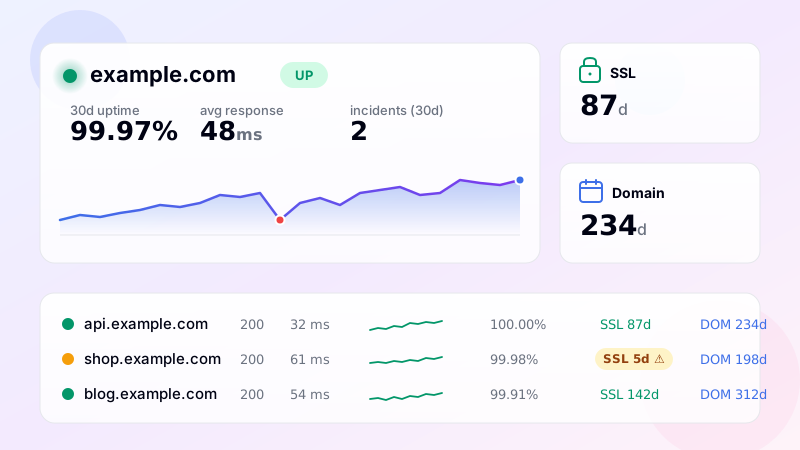
The cost of a missed SSL renewal
An SSL certificate expiring at 23:59:59 doesn't degrade gracefully. At 00:00:00 the next day, every browser starts showing a full-screen security warning, every API client fails the TLS handshake, every webhook integrator returns an error, every search engine downgrades your rankings, every email gets bounced if the certificate also covered SMTP. The fix is fast - reissue, redeploy - but the window between expiration and resolution is brutal because nobody notices the certificate before midnight, only after.
SSL monitoring exists to make sure you do notice before midnight. The monitor reads the certificate from the live host, parses the validity period, and warns you well in advance - 30 days out, 14 days, 7 days, 3 days, 1 day - so renewal is never a surprise.
What gets monitored
For each HTTPS site monitored, DiagnoSEO Uptime Monitoring opens a TLS connection, captures the peer certificate and parses it. From that, the dashboard records:
- Validity: is the certificate currently within its valid period?
- Days until expiry: a rolling count, displayed as a colored pill (green if >30 days, orange if 8-30, red if <8).
- Expiration date: the exact date.
- Issuer: who signed the certificate (Let's Encrypt, DigiCert, GlobalSign, etc.)
- Subject: the common name on the certificate.
If the certificate becomes invalid - expired, hostname mismatch, broken chain, self-signed when it shouldn't be - the monitor reports SSL invalid in addition to whatever HTTP status is happening. That makes a "broken HTTPS but server is up" condition immediately visible.
Warning thresholds
The tool fires SSL warnings at five thresholds: 30, 14, 7, 3 and 1 day before expiry. Each is a separate alert. If you have email and Telegram alerts enabled, you'll get five reminders as expiry approaches - increasingly urgent. The first one (30 days) is for planning. The 14-day one is for "no really, do it this week". The 7, 3 and 1-day alerts exist for the case where the renewal didn't happen and somebody needs to be paged immediately.
You can disable these per channel - some teams want SSL alerts only by email, not on Slack/Telegram (where they could be lost in chat noise). Configure that in Notifications.
Why automatic renewal isn't enough
If you use Let's Encrypt with certbot or a similar auto-renewal tool, you might think SSL monitoring is unnecessary. It isn't. Auto-renewal can break in many ways: certbot's account email becomes invalid, ACME challenges fail because of a firewall rule change, the renewal cron stops running, a container restart wipes the renewal state, the domain validation fails because of a DNS change. In all those cases, the certificate is set to expire and your auto-renewal isn't going to save you. SSL monitoring is the safety net that catches what automation missed.
For internal certs (corporate CA, mutual TLS), there's usually no auto-renewal at all - SSL monitoring is the only proactive signal that a renewal is needed.
Setup
SSL monitoring is automatic for any HTTPS monitor in DiagnoSEO Uptime Monitoring. You don't need to enable it separately. The next time the deep check runs (within 24 hours of adding the monitor, or immediately if you click "Check now"), the SSL section of the row populates with the issuer, expiry date and days remaining. From then on, the monitor watches that certificate and alerts you on the 30/14/7/3/1-day thresholds.
For non-HTTPS monitors, SSL is skipped. For monitors with a non-standard SSL port, the tool tries the matching port (443 by default; 465 for SMTPS, 993 for IMAPS, etc. depending on the monitor type).
Frequently asked questions
-
The standard warning thresholds are 30, 14, 7, 3, and 1 day before expiry. Thirty days gives you time to plan renewal during business hours; the shorter alerts escalate urgency. If you rely on auto-renewal (Let's Encrypt with certbot), the 7-day alert is the moment to check whether renewal actually ran — silent renewal failures are common and only get caught by separate monitoring.
-
Yes. The monitor opens a real TLS handshake and inspects the served certificate. If the certificate is expired, self-signed, has a CN/SAN mismatch with the hostname, or is signed by an unknown CA, the check fails with a specific error. This catches "certificate is technically valid but installed wrong" issues that browsers also flag.
-
Missing intermediate certificates produce a "chain incomplete" error in many TLS clients (curl, older Android devices) even though desktop browsers may auto-recover by fetching the chain. Our SSL check requires a complete, valid chain — if the intermediate is missing the check fails, surfacing the problem before mobile users notice.
-
Yes — configure the monitor URL with the port (e.g.
https://api.example.com:8443/). The monitor connects to that port for the TLS handshake and reads the certificate from there. The same works for SMTP STARTTLS, IMAP/POP3 TLS, and other protocols that wrap TLS over custom ports. -
No. The TLS handshake and certificate inspection happen as part of every HTTPS check — no separate cost. Expiry-warning alerts at the 5 thresholds are also free. WHOIS lookups for domain expiry are the only adjacent feature that runs on a separate daily schedule.
UptimeRobot · Pingdom · BetterStack · Oh Dear · Site24x7 · StatusCake · Sentry · Uptrends · Cronitor · New Relic
Domain expiry · DNS monitoring · Ping (ICMP) · Port (TCP) · Endpoint · Keyword · API · Cron / Heartbeat · Response time · Backlink · Location-specific · Website monitoring