
Website Monitoring
Watch every site you ship - landing pages, ecommerce, dashboards, member areas - and find out about outages before your users tell you.
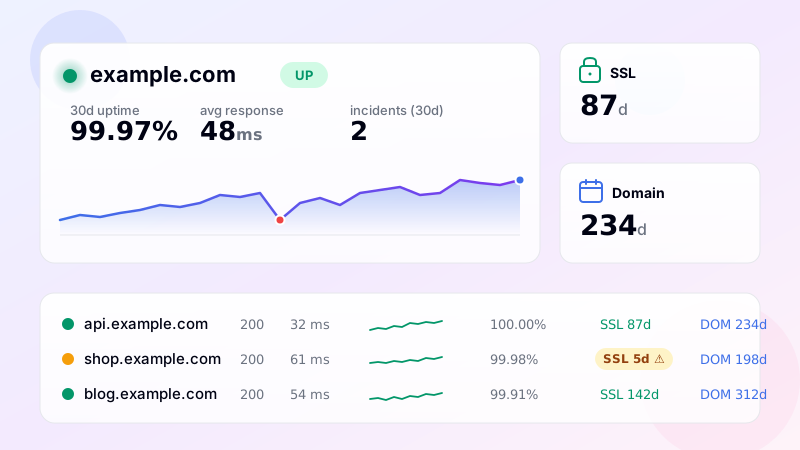
What website monitoring actually solves
Every website you publish is one moving piece in a system you don't fully control. Your hosting provider reboots a node. A registrar fails to renew the domain. A new deploy quietly breaks a redirect chain. A CDN edge in Frankfurt starts returning 502s for half your European traffic. None of these failures arrive with a notification - users hit them, then leave. The cost is real: lost orders, broken SEO, support tickets, churn, missed advertising spend.
Website monitoring closes that visibility gap. Instead of waiting for a customer to complain, the monitoring tool checks every site on a regular interval, validates the response and tells you the moment something looks wrong. With DiagnoSEO Uptime Monitoring you get the full picture - not just "is it up?" but also which HTTP code came back, how long the response took, whether the SSL certificate is still valid, when the domain expires, and whether DNS records have changed since the last successful check.
What gets checked on every cycle
For each website monitor, the tool performs a real HTTP request from our servers, follows up to five redirects and parses the response. That single check produces a stack of signals: status code, response time in milliseconds, page size, server header, content encoding, presence of HSTS / CSP / X-Frame-Options / X-Content-Type-Options security headers, the <title> tag, the meta description, the language attribute and whether a viewport tag and Open Graph tags are present. If you've configured a keyword to look for in the response body, that match is verified too. Any of these signals can trigger an alert - for example, if the page returns 200 but the keyword is missing, that's a silent failure most uptime tools would miss.
Once a day (or whenever you click "Check now"), a deeper check also runs: the SSL certificate is fetched and parsed for issuer and expiry date, the domain WHOIS is queried for the registration expiration, DNS records are pulled for A / AAAA / MX / NS / TXT / SPF / DMARC / CAA, and the hosting provider plus any CDN in front of it is detected from headers and reverse DNS.
How alerting is wired
You connect any combination of five channels: Email, Telegram, Slack, Discord and SMS. Each channel can be toggled independently for down/recovery, SSL warnings (30/14/7/3/1 days before expiry), domain warnings (60/30/14/7/3/1 days), DNS changes and response time threshold breaches. There's a confirmation period (default two consecutive failed checks) so a flaky one-second hiccup never wakes you up. Quiet hours suppress non-critical alerts overnight.
Built for many sites at once
If you run an agency, manage a portfolio of properties, or operate a dozen microservices, single-site uptime tools become a chore. Our dashboard handles thousands of monitors per account: tag them, filter by status, sort by uptime or expiring SSL, paginate, search and export to CSV. Bulk add accepts a textarea - paste your URLs (with optional keyword and interval per line) and they're scheduled in one go.
Under the hood, checks run in parallel via curl_multi at a configurable concurrency, so a batch of two hundred HTTP monitors completes in seconds rather than minutes. History is aggregated automatically - raw data for the last 24 hours, hourly aggregates for 30 days, daily aggregates for a year - which keeps the database lean even at scale.
Free vs paid
You can monitor up to five websites for free at 30-minute intervals with email alerts. Paid plans unlock 1-minute intervals, more channels (Telegram, Slack, Discord, SMS), multi-location checks from 13 countries, longer history retention and custom HTTP / API monitoring. Regular checks don't consume credits - credits are only spent on premium features like multi-location checks (1 credit per check) or SMS sends (5 credits each).
Getting started
Open the tool, paste your URLs, pick a check interval, choose your alert channels, done. Within minutes you'll have a live dashboard of every site you publish, with response time graphs, uptime percentages, SSL/domain countdowns and instant alerts the moment anything breaks.
Frequently asked questions
-
HTTP/HTTPS uptime check + SSL certificate tracking + domain expiry tracking + DNS change detection + response time. All five run automatically on every monitored URL. No need to configure them separately.
-
Depends on your plan: every 1 minute on Pro and Enterprise, every 30 minutes on Advanced, every 60 minutes on Basic. Multi-region checks count separately per region — adjust intervals based on plan limits.
-
Yes — configure custom HTTP headers (session cookie, JWT token) or use Basic Auth on the monitor. The credentials are encrypted at rest. Note: short-lived tokens require manual refresh; for long-running monitoring use a long-lived service token.
-
The monitor reaches your CDN edge, not your origin. That's usually what you want — it measures what users see. If you need to monitor origin specifically (e.g. to catch CDN-cached errors that hide origin failures), use a non-cached URL or custom Host header to bypass the CDN.
-
Either: (1) whitelist our checker IP ranges in your firewall, (2) use Basic Auth credentials on the monitor, (3) deploy a self-hosted heartbeat agent inside your network. Option 2 is simplest for most cases.
UptimeRobot · Pingdom · BetterStack · Oh Dear · Site24x7 · StatusCake · Sentry · Uptrends · Cronitor · New Relic
SSL monitoring · Domain expiry · DNS monitoring · Ping (ICMP) · Port (TCP) · Endpoint · Keyword · API · Cron / Heartbeat · Response time · Backlink · Location-specific