
Ping Monitoring
Verify your server is alive at the network layer - independent of any web service running on top.
Why ping when you already monitor HTTP
HTTP monitoring tells you whether a website serves a valid response. Ping monitoring tells you whether the underlying machine is reachable at all. Those are different questions, and the difference matters when something breaks. If your web app crashes but the server itself is fine, HTTP fails while ping still succeeds - that narrows the diagnosis instantly. If both fail, you're looking at a network or infrastructure outage. If only ping fails, your firewall might have started blocking probes while HTTP still works for real users.
Ping monitoring is also the right tool for hosts that don't run HTTP at all: database servers, mail servers, application servers behind a load balancer, VPN gateways, internal services, anything where you just need to know "is this box up and reachable on the network".
Why TCP-based ping
Classic ICMP ping (the "ping" command) is great for desktops but unreliable for monitoring from cloud servers. Most modern firewalls block or rate-limit ICMP, especially from public-facing networks, so an ICMP timeout can mean either "the server is down" or "the firewall ate the packet." That ambiguity is fatal for an alerting tool.
DiagnoSEO Uptime Monitoring uses TCP-based ping instead: the check opens a TCP connection to a well-known port (80 first, falling back to 443) with a 5-second timeout. If the SYN/ACK comes back, the host is reachable. If it doesn't, you get a real failure with the kernel-level error code (connection refused, timeout, no route to host) which makes triage faster.
What gets recorded
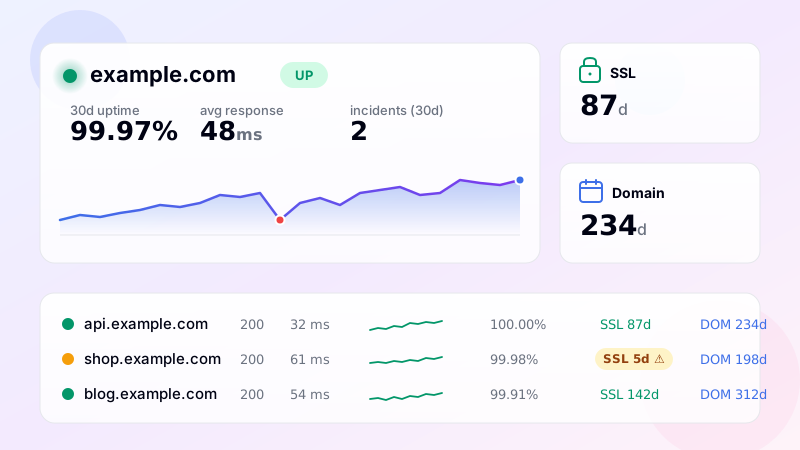
Each ping records the result (up / down) and the round-trip time in milliseconds. That goes into the same history pipeline as HTTP monitors - you get a sparkline of recent checks, 24-hour and 30-day uptime percentages, and a heatmap of availability over the last month. If the host is down, an incident is opened and notifications fire on your enabled channels.
Tips for ping monitors
- Pick a busy interval: ping is cheap, so set it to 1-5 minutes if your plan allows. Faster detection at low cost.
- Combine with port monitors: if you have a database on 5432 or a mail server on 25, add a port monitor too. Ping says "the box is up", port says "the service is listening".
- Watch round-trip time: the response time is recorded on every check. Sudden jumps in RTT often precede full outages - configure a threshold and you'll catch them before they become incidents.
- Use confirmation period: networks blip. The default of 2 consecutive fails before alerting protects you from noisy false positives.
How it fits in the dashboard
Ping monitors appear next to your HTTP, port, keyword, API and heartbeat monitors in the same list. You can tag them ("infra", "internal"), filter by status, sort by RTT, and pause/resume them like any other monitor. Alerts go through the same channels (Email, Telegram, Slack, Discord, SMS) with the same quiet hours and confirmation period rules.
Setup
Open the tool, click "Add monitor", choose type "Ping (TCP)", paste the host (e.g. db.internal.mycompany.com), set the interval and save. From the next cycle the monitor opens a TCP connection every minute, records RTT and tells you the moment the host stops answering.
Frequently asked questions
-
Layer-3 reachability check — does the host respond to ICMP echo. Useful for routers, switches, IoT devices, internal infrastructure, and anything that doesn't run HTTP but should be reachable.
-
Most cloud providers block ICMP at the security-group or firewall level by default. The server is otherwise healthy but won't respond to ping. For cloud workloads, prefer HTTP or TCP port checks. You can explicitly allow ICMP in security groups if you really need ping.
-
Ping uses ICMP (no port — pure layer-3 reachability). TCP port check opens a TCP connection on a specific port — confirms layer-4 connectivity. A host can pass ping but fail TCP (firewall blocking the port) or vice versa (ICMP blocked but port open).
-
Yes — the response time (round-trip) is recorded with each check and tracked over time. Useful for detecting network degradation: same host but RTT slowly climbing from 20ms to 200ms means there's a routing or congestion issue.
-
Only if the IP is reachable from our checker servers — which means public IPs. Private RFC1918 ranges (192.168.x.x, 10.x.x.x, 172.16-31.x.x) won't work from external monitoring. For internal infrastructure, run a self-hosted heartbeat agent on the internal network that pings us.
UptimeRobot · Pingdom · BetterStack · Oh Dear · Site24x7 · StatusCake · Sentry · Uptrends · Cronitor · New Relic
SSL monitoring · Domain expiry · DNS monitoring · Port (TCP) · Endpoint · Keyword · API · Cron / Heartbeat · Response time · Backlink · Location-specific · Website monitoring